



Email tracker#
This feature requires ShopMagic 3.0 plugin version
ShopMagic has a built-in email tracker for messages sent through the plugin. It records email opens and link clicks.
Go to ShopMagic → Logs → Email tracker to view tracking statistics. The tracker is available alongside Outcomes and Queue.
Enable or disable email tracking#
Email tracking is enabled by default.
To change this setting, go to ShopMagic → Settings → General, select or clear Enable email tracking, and save the changes.
Disabling tracking stops recording new messages and adding tracking elements to them. Existing tracking records remain available.
Filter emails per Automation and Customer#
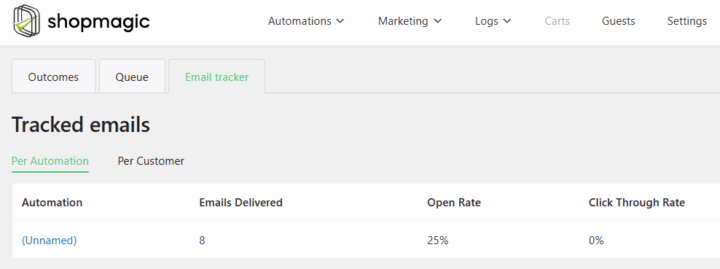
Select a tab to view statistics:
- Per Automation — messages grouped by automation.
- Per Customer — messages grouped by recipient email address.
Each view displays three metrics:
| Metric | Description |
|---|---|
| Emails Delivered | Number of recorded email messages. Messages are recorded before sending. This value does not confirm successful sending or delivery to the recipient’s inbox. |
| Open Rate | Percentage of recorded messages marked as opened. Each message counts once, regardless of repeated opens. |
| Click Through Rate | Percentage of recorded messages with at least one tracked link click. Multiple clicks in the same message do not increase this percentage. |
Email statistics are also available as a chart on the ShopMagic dashboard.
How tracking works#
Email opens#
ShopMagic adds a tracking image to HTML messages. An open is recorded when this image loads.
If the email client blocks the image, the open may not be recorded. Plain-text messages do not include the tracking image.
Clicking a tracked link also marks the message as opened, even if the tracking image has not loaded.
Link clicks#
ShopMagic replaces supported HTML links with tracking links. Opening a tracking link records the click and redirects the recipient to the original destination.
HTTP and HTTPS links are supported. Links using mailto: or tel: are not tracked.