




Segmentation sounds like a reporting exercise and is actually a sending decision. Every automation in a store already segments, whether or not anybody designed it, because every automation has an implied answer to the question of who should receive this.
What segmentation means in a WooCommerce store
A condition attached to an automation that decides whether it runs for this particular order or customer. Not a saved list, not an export, not a tag maintained by hand, but a rule evaluated at the moment the email would otherwise be sent.
The distinction matters because a list goes stale the day after it is built. A customer who qualified for a win-back campaign last Tuesday may have ordered on Wednesday, and an exported list has no way of knowing. A rule checked at send time does, which is the entire argument for doing this inside the store rather than in an external tool.
In practice the useful conditions come from three places: the order itself, such as its total, its products or its payment method; the customer’s history, such as how many orders they have placed or when the last one was; and the context, such as the shipping country or whether a coupon was used.
The segments worth building first
High-value orders are the obvious one, and the one most stores build badly. A threshold set on a single order misses the customer who has spent five times as much across ten small purchases, which is usually the more valuable relationship.
First-time buyers are the second, because almost everything a store sends should read differently to somebody who has never ordered before. A thank-you that assumes familiarity, sent to a stranger, is the most common segmentation failure there is.
Lapsed customers are the third, and they need a definition rather than a feeling. Pick the number of days after which a customer in your category has clearly stopped buying, and set the rule from that rather than from a round number that sounded reasonable.
Where segmentation goes wrong
The commonest failure is too many segments. A store with fourteen automations and fourteen conditions has built something nobody can reason about, and the first time two of them fire on the same order the result is a customer receiving two contradictory emails within a minute.
The second is conditions that cannot be checked. A rule based on something the store does not record, such as why a customer stopped buying, ends up as a guess dressed in a filter. If the data is not in the order or the customer record, the segment is not real.
The third is forgetting the people who match nothing. Every set of rules leaves a remainder, and in most stores the remainder is the largest group of all. It is worth knowing how big it is before deciding the segmentation is finished. Our guide to WooCommerce marketing automation covers how the rules sit inside the wider setup.
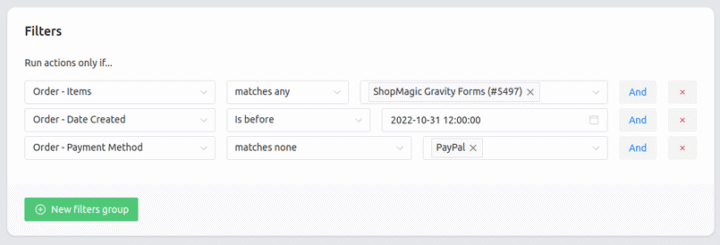
A segment is only useful if the store can check it at the moment of sending. Advanced Filters combines conditions on order total, products, customer history and shipping details into one rule on the automation, so nothing depends on a list exported last week.
Summary
Segmentation in a store is a condition attached to an automation and evaluated when the email would be sent, rather than a saved list or an exported tag. The difference is that a list built on Tuesday does not know about Wednesday’s order, while a rule checked at send time does. The conditions that matter come from the order, such as its total, products or payment method; from the customer’s history, such as order count and time since the last purchase; and from context such as shipping country or coupon use.
Three segments earn their place first. High-value customers, defined by what they have spent in total rather than on one order, since a threshold on a single basket misses the person who bought ten small things. First-time buyers, because a message written for a familiar customer reads badly to a stranger. And lapsed customers, defined by a number of days chosen from the category rather than from a round figure. The failures are equally consistent: too many segments to reason about, which ends in two contradictory emails on one order; conditions based on data the store does not hold, which are guesses in the shape of filters; and ignoring the remainder, which in most stores is the largest group of all.
Frequently asked questions
These three come up when a store moves past sending everything to everyone.
How many segments should a store have?
Fewer than it thinks. Three well-chosen conditions cover most of what a small store needs, and each additional one has to earn its place against the confusion it adds.
Can conditions be combined?
Yes, and this is where most of the value is. A rule combining order total with first-time status describes a customer worth treating differently in a way neither condition does alone.
What happens when a customer matches two automations?
Both run unless something stops them. Decide which takes priority and exclude the other explicitly, rather than relying on the delays to keep them apart.
