



A no-show costs a booking business the whole slot. Not part of it, not a rescheduling fee, the entire hour, because nobody else could book it and nobody is paying for it. Two emails prevent most of them, and neither needs to say anything clever.
The two emails that prevent a no-show
A confirmation sent immediately and a reminder sent shortly before the appointment. Between them they cover both reasons people fail to turn up, which are forgetting and never having been sure in the first place.
The confirmation goes out within seconds of the booking and carries the date, the time, the place and how to change it. The last of those is the part most stores leave out, and it is the one that converts a no-show into a reschedule. A customer who cannot find how to move an appointment does not phone, they simply do not arrive.
The reminder goes out between twenty-four and forty-eight hours before the slot. Earlier and it is forgotten again, later and the customer has no time to rearrange their day, which means a cancellation becomes a no-show for purely practical reasons.
What goes in the reminder
The same four facts as the confirmation, because the whole point is that the customer should not have to go looking for the first email. A reminder that says only that an appointment is coming up, without repeating when and where, creates work rather than removing it.
Add anything the customer has to bring or prepare, and add it here rather than in the confirmation. Two days out is when preparation actually happens, and instructions sent three weeks earlier have been forgotten along with the appointment.
Keep the change link in both. A customer who realises at the reminder that they cannot make it is the best outcome available at that point, because the slot can still be resold.
Where booking reminders go wrong
The commonest mistake is counting from the booking rather than from the appointment. A delay measured from the moment of booking sends the reminder a fixed number of days after the customer paid, which for an appointment booked two months out arrives six weeks early and for one booked tomorrow arrives after the slot has passed.
The second is sending to the wrong timezone, which only shows up when the business starts taking bookings from outside its own. Times in a reminder should carry the zone explicitly, because the customer reading it is the one who will get it wrong.
The third is forgetting the follow-up afterwards. A booking business lives on repeat appointments more than almost any other, and the email asking how it went, sent a day later, does double duty as a review request and a rebooking prompt.
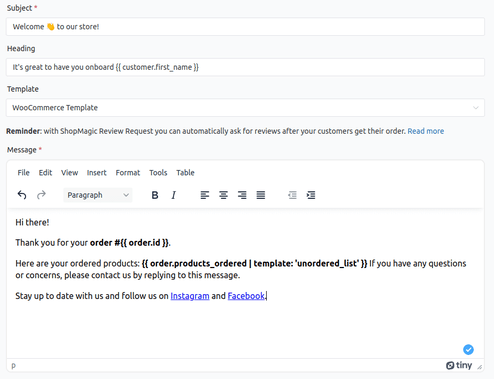
The reminder only works if the delay counts back from the appointment rather than forward from the order. ShopMagic for WooCommerce Bookings runs on booking events and reads the booking date itself, so a slot moved by the customer moves the reminder with it.
Summary
Two emails prevent most no-shows. The confirmation goes out within seconds and carries the date, the time, the place and how to change the booking, with the last of those being the part most stores omit and the one that turns a no-show into a reschedule. The reminder goes out twenty-four to forty-eight hours ahead, which is late enough to be remembered and early enough that the customer can still rearrange the day.
The reminder repeats all four facts rather than referring back to the confirmation, and it is also where any preparation instructions belong, since two days out is when preparation happens. The change link stays in both. Three mistakes recur: measuring the delay from the booking rather than from the appointment, which sends the reminder six weeks early for a slot booked two months ahead and after the fact for one booked tomorrow; omitting the timezone, which surfaces as soon as bookings come from outside the business’s own; and skipping the follow-up a day afterwards, which in a booking business works as both a review request and a rebooking prompt.
Frequently asked questions
These three come up in every booking setup.
Is one reminder enough?
For most appointment businesses, yes. A second reminder earlier in the week helps for high-value or long slots, where the cost of an empty hour justifies the extra message.
Should the reminder be an email or a text?
Text performs better for same-day reminders and email for everything else. Many businesses send the confirmation by email and the reminder by both.
What happens if the customer reschedules?
The reminder should follow the new date, which means it has to be tied to the appointment rather than to the original booking. This is worth testing before you rely on it.
