




A subscription store lives and dies on three emails, and none of them is the welcome message. Renewals that arrive without warning, payments that fail silently and cancellations that nobody follows up account for most of the churn in a subscription business.
The three emails a subscription store has to get right
The renewal reminder, the failed payment notice and the cancellation follow-up. Everything else is optional.
The renewal reminder goes out several days before the charge and exists to prevent a surprise, which is the single most common cause of a chargeback in subscription commerce. A customer who is reminded and does nothing has consented. A customer who sees an unexplained charge on a statement calls their bank, and that costs far more than the subscription was worth.
The failed payment notice is the one with money in it. Cards expire constantly, and a meaningful share of involuntary churn is nothing but an expired card nobody mentioned. The email has one job, which is to get the customer to a page where they can update the card, and it should repeat a few days later if nothing happens.
The cancellation follow-up is the one almost nobody sends. It goes out after the subscription ends, asks why in one sentence, and is the cheapest market research a store will ever run.
When to send the renewal reminder
Between three and seven days before the charge for a monthly subscription, and two to four weeks before an annual one. The principle is that the customer should have time to cancel without feeling trapped, which sounds like an argument against sending it at all and is the opposite.
A reminder that arrives the day before a large annual charge reads as a formality rather than a courtesy, and the cancellations it prevents are outnumbered by the disputes it causes. Longer notice on larger amounts is the rule worth following.
For trials the timing is different again, since the reminder before a trial converts to paid is both the most important email in the sequence and the one most likely to be left out on purpose. Sending it is better business than not sending it, even though it costs some conversions in the short term.
What the default subscription emails miss
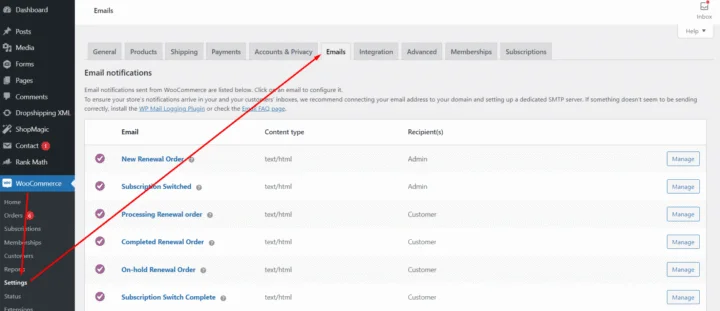
Subscription plugins send status notifications, and status notifications are not the same thing as the three emails above. A message saying a subscription has been put on hold tells the customer what the system did. It does not tell them why, or what to do next, and in most cases the reason is a card that needs replacing.
They also fire instantly, which rules out the reminder entirely, since a reminder is by definition sent before an event rather than after one. Anything scheduled in advance has to come from something that can look ahead at upcoming renewal dates rather than react to a status change. We go into the gaps in more detail in our note on what is missing in WooCommerce Subscriptions email notifications.
A reminder has to run on an upcoming renewal date rather than on a status that has already changed. ShopMagic for WooCommerce Subscriptions adds events for renewal, trial end and subscription end, which is what lets an email be sent before the charge instead of after it.
Summary
Three emails carry a subscription business. The renewal reminder prevents the surprise charge that drives chargebacks, and the customer who was reminded and did nothing has consented in a way the customer who was not never did. The failed payment notice is where the money is, because much of involuntary churn is an expired card nobody mentioned, and its only job is to get the customer to a page where they can update it, repeating a few days later if nothing changes. The cancellation follow-up, which almost no store sends, asks why in one sentence after the subscription ends.
On timing, a monthly renewal reminder goes out three to seven days ahead and an annual one two to four weeks ahead, because larger amounts need longer notice: a reminder the day before a big annual charge causes more disputes than the cancellations it prevents. Trial-to-paid reminders are the ones most often omitted deliberately, and sending them is better business even though it costs conversions. Default subscription notifications do not cover any of this. They report what the system did rather than why, and they fire instantly, which rules out a reminder entirely, since anything sent before an event has to look ahead at renewal dates rather than react to a status change.
Frequently asked questions
These three come up in every subscription store.
How many times should a failed payment email repeat?
Two or three attempts over about a week covers most recoverable cases. Past that the customer has usually decided, and further emails read as pressure.
Should the renewal reminder include a cancel link?
Yes. Hiding it does not stop cancellations, it moves them to the bank, and a dispute costs more than a cancellation does.
Can reminders be sent for subscriptions created before the automation existed?
Usually yes, since the reminder reads the upcoming renewal date rather than the sign-up event. That is worth confirming before you rely on it.
