
• Skip to primary navigation
  • Skip to main content
ShopMagic logo cropped for use as a site icon
WP Desk

WP Desk

WooCommerce Plugins

Flexible Invoices

Flexible Invoices

Automate invoicing

Flexible Coupons

Flexible Coupons

Gift cards and tickets

ShopMagic

  • Pricing
  • Add-ons
  • Docs
  • Support
  • Blog
  • Ideas
  • My account
  • English
ShopMagic 2.20 is here. BCC field, Order Paid event and payment reminder

Published: December 30, 2020 / Updated: October 23, 2026 / Blog, New Release Wednesday

ShopMagic 2.20 is here. BCC field, Order Paid event and payment reminder

Damian Machnik

This is the last update which we are releasing this year. This time we focused on some overall improvements which we hope you will find useful. What exactly is added in ShopMagic 2.20? I invite you to read the article.

BCC field available for everyone

BCC (Blind carbon copy) allows the sender of a message to conceal the person entered the BCC field from the other recipients. This feature was initially added in ShopMagic 2.4 however, it required some extra work from you. Until now, you needed to add it with a proper filter.

Starting from the 2.20 it is no longer required. BCC field will be available in every automation and for every user. If you do not want to use it – simply omit this field while creating your automation.

ShopMagic BCC field

Extra note. Emails added in BCC won’t be visible in queue and outcomes which is intentional. Let us know if you want to extend this feature.

New event – Order Paid

This event is a combination of two events available in ShopMagic – Order Processing and Order Completed. Order Paid was one of the most requested ideas, so naturally we had to add it. How does it work? Use it whenever you want to create a universal automation which should be triggered when order, regardless of the method, is paid.

Shopmagic Order Paid Event

New placeholder – {{ order.payment_url }}

This placeholder is basically a payment reminder for your customers. Super important and another feature in ShopMagic’s arsenal which will increase conversion rate for your WooCommerce store.

How does it work? Create an automation for Order Pending event and add {{ order.payment_url }} placeholder to the message field. When the user receives the email, there’ll be a link to complete the payment. It will redirect user to the /checkout/order-pay/ website in your store.
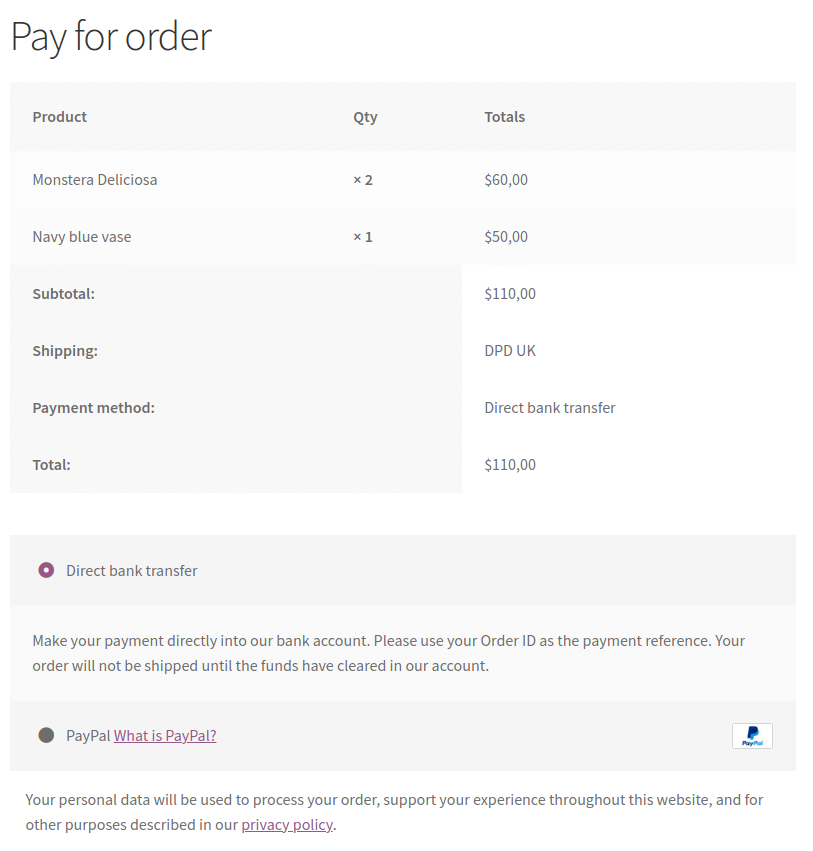
ShopMagic payment reminder

Bear in mind, that payment reminder works for orders with pending payment status only.

You may read more on how to set up pending payment email notifications in WooCommerce with ShopMagic.

Abandoned Carts fixes

Simultaneously with ShopMagic 2.20 we are releasing ShopMagic Abandoned Carts 1.0.1. Our add-on to recovering WooCommerce abandoned carts is receiving more and more attention. Thanks to your feedback we were able to fix few small issues which occurred or could occur in the future.

If you are not familiar with ShopMagic Abandoned Carts, I’ll recommend giving it a shot. It’s free and will increase your conversion rate right from the start.

About Damian Machnik

Product Manager en WP Desk. Cada día intento crear productos mejores y más interesantes. Si tienes alguna pregunta, ¡no dudes en enviarme un correo!

  • Terms & Conditions
  • Privacy Policy
  • Support Policy
  • Refund Policy

© 2026 A WP Desk WP Desk Automation

Manage Consent
To provide the best experiences, we use technologies like cookies to store and/or access device information. Consenting to these technologies will allow us to process data such as browsing behavior or unique IDs on this site. Not consenting or withdrawing consent, may adversely affect certain features and functions.
Functional Always active
The technical storage or access is strictly necessary for the legitimate purpose of enabling the use of a specific service explicitly requested by the subscriber or user, or for the sole purpose of carrying out the transmission of a communication over an electronic communications network.
Preferences
The technical storage or access is necessary for the legitimate purpose of storing preferences that are not requested by the subscriber or user.
Statistics
The technical storage or access that is used exclusively for statistical purposes. The technical storage or access that is used exclusively for anonymous statistical purposes. Without a subpoena, voluntary compliance on the part of your Internet Service Provider, or additional records from a third party, information stored or retrieved for this purpose alone cannot usually be used to identify you.
Marketing
The technical storage or access is required to create user profiles to send advertising, or to track the user on a website or across several websites for similar marketing purposes.
  • Manage options
  • Manage services
  • Manage {vendor_count} vendors
  • Read more about these purposes
View preferences
  • {title}
  • {title}
  • {title}