



Does ShopMagic support custom order statuses?#
Yes. ShopMagic supports custom order statuses registered with WooCommerce. You can add them using a separate plugin or custom code. ShopMagic does not create custom order statuses itself.
To trigger an automation when an order changes to or from a custom status, use the Order Status Changed event. This event is available in the free version of ShopMagic.
How to configure the automation#
- Make sure your custom status is registered and available in WooCommerce.
- Go to ShopMagic → Automations and create or edit an automation.
- Select Order Status Changed as the event.
- Set Status changes from to the source status, or select Any status.
- Set Status changes to to your custom status.
- Configure the actions and any filters, then save and publish the automation.
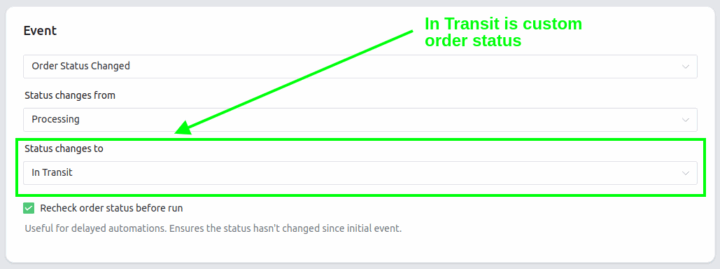
For example, to send an email whenever an order enters a custom Ready for collection status, select Any status as the source and Ready for collection as the destination.
You can also select a custom status in Status changes from to trigger actions when an order leaves that status. Selecting Any status in both fields makes the event respond to all order status changes.
Rechecking the status before execution#
Enable Recheck order status before run if the action should run only while the order still has the status selected in Status changes to. This is useful when delaying actions with ShopMagic Delayed Actions.
If Status changes to is set to Any status, the recheck does not require a specific current status.
Using custom statuses in filters#
With the ShopMagic Advanced Filters add-on, custom statuses are also available in the Order - Status filter for events that provide order data.
If your custom status is missing or the automation does not run#
- Confirm that the plugin or code registering the status is active.
- Reload the automation editor after adding a new status. ShopMagic reads the available statuses from WooCommerce.
- Make sure the status change uses WooCommerce's normal order update process. Direct database changes can bypass the event ShopMagic listens for.
- Check the selected source and destination statuses, automation filters, and publication status.
Publishing the automation does not run it for orders already in the selected status. A matching status change must occur after publication.