



Most of what a store needs to do after an order happens somewhere other than WordPress. The accounting system, the shipping label, the spreadsheet somebody actually looks at, the CRM. Getting the order there usually means either a plugin per destination or somebody retyping it.
What a webhook sends and what Zapier does with it
A webhook is a message the store sends the moment something happens, carrying the details of what happened, to an address you choose. Zapier is one of the things that can listen at that address and then do something with what arrives.
The division of labour is worth being clear about, because it decides where problems get solved. WordPress decides when to send and what to include. Everything after that, including which app receives it, how the fields map and what happens on a failure, belongs to the other side. Which means a broken integration is usually not a WooCommerce problem, and looking for it in the store wastes an afternoon.
What travels is a structured payload rather than an email. The receiving system gets the order number, the customer, the line items and the totals as data it can read, which is the difference between an integration and a notification.
What is worth connecting
Three things repay the setup for most stores, and they are rarely the ones people try first.
Accounting is the obvious one, because it removes retyping and retyping is where the errors are. An order arriving as a draft invoice in the accounting system is less work and fewer mistakes than the same order typed from a PDF on a Friday afternoon.
A spreadsheet is the underrated one. Plenty of teams run on a shared sheet, and a row appended per order gives everybody a view that needs no logins and no training. It is also the fastest way to answer a question nobody built a report for.
A CRM is the third, and the one worth doing selectively. Pushing every order into a sales system fills it with noise, while pushing orders above a threshold, or orders from business customers, creates a list somebody will actually work through.
What to check before you rely on it
Check what happens when the far end is down, because it will be. A webhook sent to a service that is not responding either retries or disappears, and which one it does is the difference between a missing order and a late one.
Check what triggers it, and be specific. A webhook on order creation fires before payment, which means the accounting system receives invoices for orders that were never paid. Payment complete is almost always the right event, and it is the one most people get wrong on the first attempt.
And check what is in the payload against what the receiving system needs, before building anything on top of it. The expensive version of this mistake is discovering six weeks in that the field the other side keys on was never being sent.
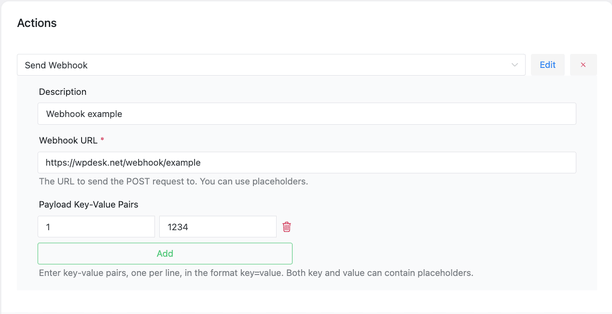
Choosing the event and filtering before anything leaves the store is what keeps an integration cheap, since most services bill per task received. ShopMagic Webhooks sends the payload as an automation action, so the same conditions that decide who gets an email decide what reaches Zapier.
Summary
A webhook is a message the store sends at the moment something happens, carrying structured data to an address you choose, and Zapier is one of the services that can listen there. The split matters: WordPress decides when to send and what to include, and everything after that, including field mapping and failure handling, belongs to the receiving side, so a broken integration is usually not a store problem.
Three destinations repay the work. Accounting, because it removes the retyping that causes the errors. A shared spreadsheet, which is underrated and gives a team a view requiring no logins. And a CRM, which should be fed selectively, since every order makes noise while orders above a threshold make a list somebody works through. Before relying on any of it, check three things: what happens when the far end is down, since that decides whether an order is late or lost; which event fires it, because order creation happens before payment and will produce invoices for orders nobody paid for, making payment complete the usual right answer; and whether the payload actually contains the field the receiving system keys on.
Frequently asked questions
These three come up before the first integration goes live.
Do you need Zapier specifically?
No. A webhook sends to any address that accepts one, so a bespoke endpoint or another automation service works the same way.
Can a webhook send only some orders?
Yes, if the automation carrying it has a condition. Filtering in the store is cheaper than filtering on the far side, where most services charge per task.
What happens to orders placed before the webhook existed?
Nothing, since a webhook fires on an event as it happens. Backfilling historical orders is an export job rather than an integration one.
