



Queue#
Go to ShopMagic → Logs → Queue to view ShopMagic actions waiting to run. The queue includes actions scheduled for a future date and actions waiting for background processing, including those whose scheduled time has already passed.
This view is especially useful when using the Delayed Actions add-on to delay emails or other actions. However, the queue also works without this add-on.
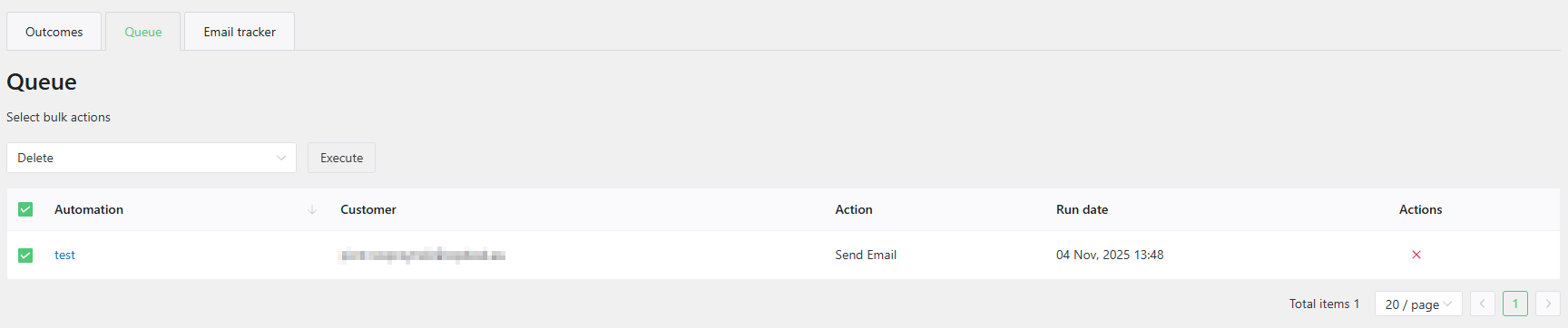
Queue columns#
Each row represents one queued action, rather than an entire automation. The table contains the following columns:
- Automation — The automation's title. Click it to open the automation editor.
- Customer — The associated customer's email address. If customer data is unavailable, the table displays a message indicating that no customer is associated with the automation.
- Action — The action type, such as Send Email. This is the action's name, rather than the custom text entered in its Description field.
- Run date — The scheduled execution date and time, displayed in the timezone configured for your WordPress site. This is when the action is due to run; actual execution depends on background processing.
- Actions — The Cancel control, shown as an X icon, which cancels the queued execution.
Canceling an action#
To prevent a pending action from running, click the X icon in its Actions column.
Canceling a queue entry affects only that scheduled execution. It does not delete or disable the automation, cancel its other queue entries, or prevent new actions from being queued when the event occurs again.
Canceling multiple actions#
- Select the queue entries using the checkboxes beside them.
- Choose Delete from the bulk actions dropdown.
- Click Execute.
Although the bulk option is labeled Delete, it cancels the selected queued executions. It does not delete the automations or customer records.
Checking execution results#
The Queue displays pending actions. Once an action has been processed, it no longer appears here. Check Outcomes for its execution result; disappearance from the Queue alone does not confirm that an email was delivered or an action succeeded.
If actions remain in the Queue after their run dates, check that your site's WordPress cron and Action Scheduler background processing are working.