





Some may say that marketing automation tools may help your business – just like magic. That is 100% true. Initially, you need to make a little effort to customize your ShopMagic plugin and after that… it all starts working independently.
Building customer relationships on every stage of the sale
Managing e-commerce can be a tough role to do. First, you have to do the basics – create and configure your own website. If it’s based on WooCommerce, you can use many different tools and plugins in order to set up your sales process.
Have in mind that selling product does not end in just one step. Your customer needs to be well informed about his order. So let us move to the world of magic and see how our ShopMagic plugin can help you sending WooCommerce new order email to your customers.

First spell – I need to download ShopMagic
Yes! This is as simple as it seems. Our ShopMagic tool is available for free. Just visit WordPress.org and search for ShopMagic or just use our direct link below.
You can also search for ShopMagic in your WordPress cockpit and install it directly. After downloading is completed you will see our plugin in your cockpit. Just choose ShopMagic in your main menu and you will see the automations.
Look how easy and clear it presents in WordPress cockpit. Suits perfectly!
Second spell – I want to send WooCommerce new order email
That’s obvious! You want to start using ShopMagic and see how it works in practice. For this case, let us assume that your customer has just purchased a nice pair of shoes from your shop. He has created new order so he should receive a confirmation that your shop has registered his action.
Remember! Staying in touch with your customer on every stage of contact improves his sense of security and consequently – an attitude towards your brand.
ShopMagic can also send notifications about processed order, completed order cancelled order, failed order, refunded order, etc. Depending on the customer needs.
We wrote some more guides on the subject:
- New Order
- Pending Order
- Processing Order
- Cancelled Order
- Completed Order
- Failed Order
- On-Hold Order
- Refunded Order
How to configure ShopMagic to send new order email?
First, you need to create a new automation – an automatic process that will relieve you in online contacts with the customer. Without automation, many things had to be done manually and ineffectively.
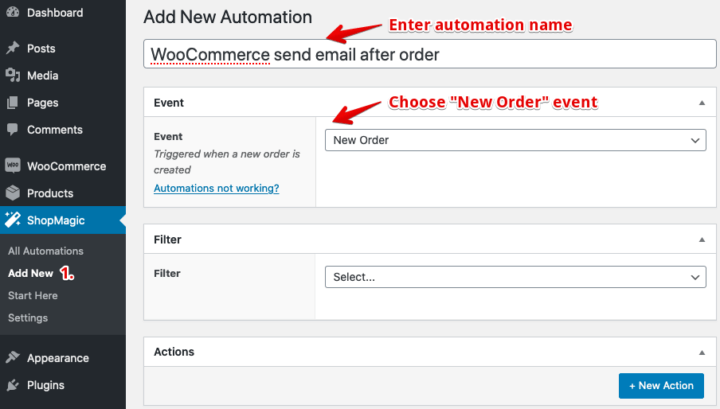
So, click: ShopMagic → Add New. Next, name your automation in order to easy recognize it later and pick an event – in our case New Order.
Last spell – be creative and surprise customer also with your message
If you want to configure your email message, click on New Action blue button. This will help you set up your email. Of course you need to choose Send Email option as an action you want to achieve. Then enter the description for your reference and choose your subject. Try to figure out something catchy, for instance:
Great decision! Your shoes are almost there. Finish your order!
What next?
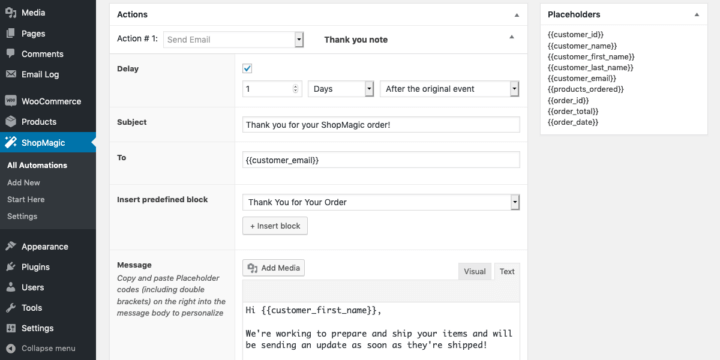
On the screen below, you can see some phrases in brackets. These are placeholders that will be automatically replaced by actual data while sending. Write your personalized message or choose one of our proposals – it’s up to you.
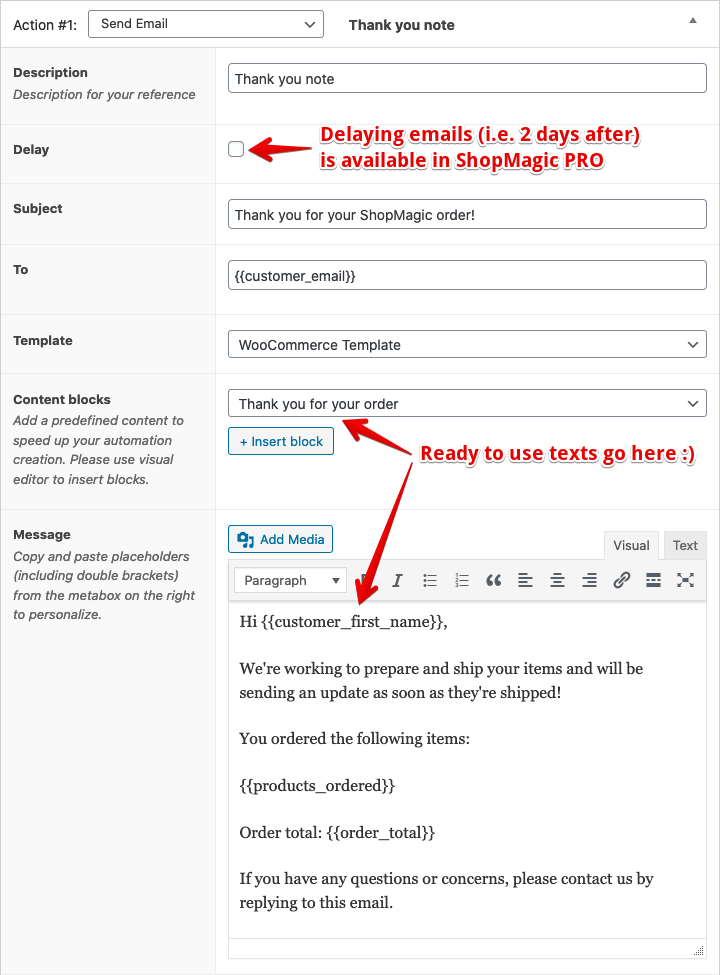
And that’s it! As you can see configuring ShopMagic is quick and easy.
Thanks to using marketing automation tools you have more time on developing your business. Think about standing out of the crowd and customize your messages in a creative way. WooCommerce new order email can be useful but also well written, smart and funny.
And this is real magic. Are you ready?
