




Around seven in ten WooCommerce carts are abandoned, and WooCommerce itself does nothing about it: there is no abandoned cart record, no capture of the shopper’s address and no recovery email anywhere in core. Closing the gap takes two free plugins, ShopMagic plus its Abandoned Carts add-on, which capture the email address at checkout before the order exists and send a reminder with a link that restores the cart. Three things decide whether it earns anything. The email has to arrive while the shopper still remembers deciding, which means within the first hour rather than the next day. It has to contain the cart restore link, because without it you are asking someone to rebuild their basket from memory. And in the EU, capturing that address for recovery does not entitle you to add it to a marketing list, which is a separate purpose needing its own consent. All three are covered below.
ShopMagic
Recover your abandoned carts in WooCommerce effectively and with style and customized emails!
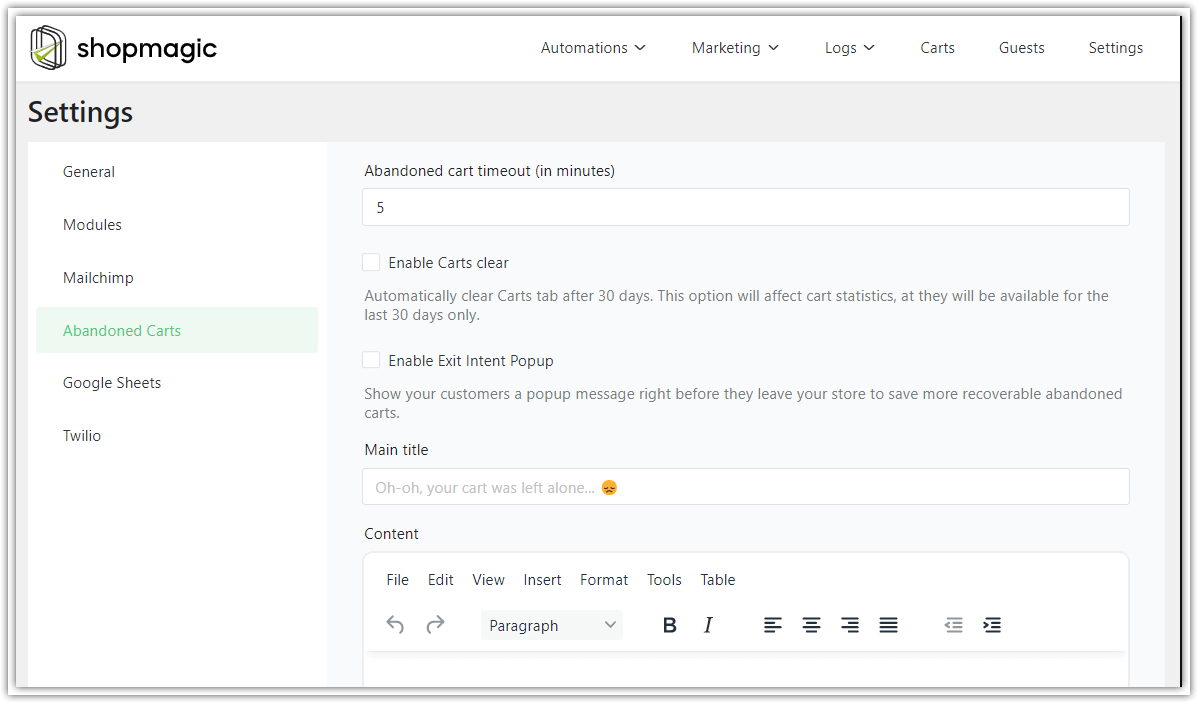
Download for free or Go to WordPress.orgHow abandoned cart recovery works in WooCommerce
Start with what is missing, because it explains why a plugin is needed at all.
When a shopper fills a cart and leaves, WooCommerce stores nothing you can act on. The cart lives in a session or in browser storage. No order is created, so there is no record in WooCommerce → Orders, no status to trigger on and, critically, no email address anywhere in your database. You cannot email someone whose address you never captured, and this is the real obstacle rather than the absence of a template.
The capture is therefore the whole mechanism. ShopMagic’s Abandoned Carts add-on watches the checkout form and saves the email address as soon as the shopper types it, before they submit anything. From that moment the cart becomes a record you own: contents, total, address, timestamp. If the order completes, the record closes. If it does not, a timer starts and the automation fires.
This is why abandoned cart recovery works for guests as well as registered customers, which matters because most WooCommerce buyers never create an account. The add-on does not need a user record; it needs an address typed into a field.
Two practical notes before you build anything.
Check which checkout you run. In WP Desk’s telemetry from 19,803 WooCommerce stores (August 2026), 87% are still on the classic checkout and 13.8% use the block cart. The classic and block checkouts expose their fields differently, so if you are on blocks, test the capture with a real abandoned cart rather than assuming it works.
Capture is the point of failure, not sending. If recovery emails are not going out, the usual cause is that no address was captured, not that the email failed. Check the add-on’s cart list first: if it is empty while your analytics show abandonment, the problem is upstream of email entirely.

⬇️ Both plugins are free ⬇️
You need ShopMagic itself first; the add-on extends it rather than running alone.
ShopMagic
Recover your abandoned carts in WooCommerce effectively and with style and customized emails!
Download for free or Go to WordPress.orgTable of contents
- How abandoned cart recovery works in WooCommerce
- Why abandoned carts are worth the effort
- Why customers abandon their carts
- When to send the recovery email
- What the recovery email must contain
- Consent: the rule that catches EU stores out
- ShopMagic and Mailchimp
- Measuring whether it works
- Beyond cart recovery
- Common questions answered
- Summary
- Frequently asked questions
Why abandoned carts are worth the effort
Because the people in question have already done everything except pay.
A shopper with items in a cart has found your store, chosen a product, accepted the price and begun checkout. Every cost of acquiring them has already been paid. Compared with the work of attracting someone new, recovering someone who got as far as the checkout form is the cheapest sale available to you.
The scale is well documented. The Baymard Institute maintains a running average from dozens of studies and puts cart abandonment at roughly 70%. The figure moves as new studies are added, so treat it as an order of magnitude rather than a constant, and measure your own rate rather than quoting anyone else’s.
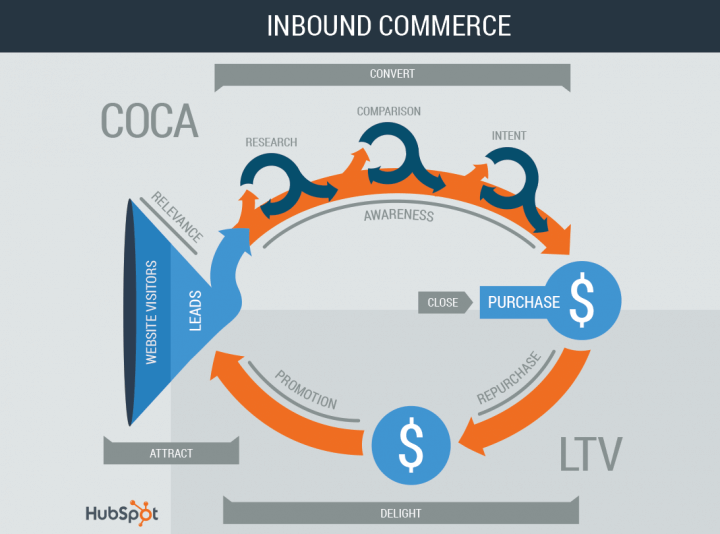
Your own number is the one that matters, and it is worth calculating before you build anything: carts created versus orders completed, over a month. A store at 50% has a different problem from a store at 85%, and the second is usually a checkout problem that no email will fix.
Why customers abandon their carts
Mostly because they were never going to buy today, and that shapes what the email should say.
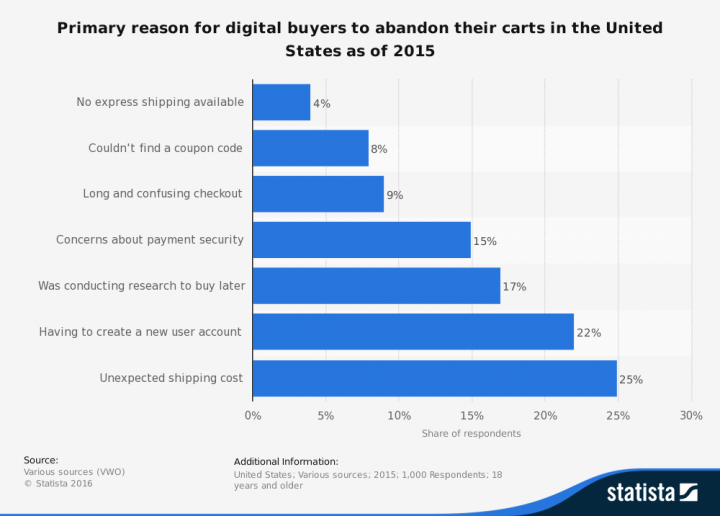
Surveys consistently put “just browsing, not ready to buy” at the top, by a wide margin. Behind it sit a cluster of reasons that are not about readiness at all: unexpected shipping costs appearing at the final step, being made to create an account, and comparison shopping across several sites at once.
That split matters because the two groups need different treatment, and only one of them is an email problem.
The “not ready” group is who recovery email is for. They need reminding, and a reminder works because the decision was deferred rather than rejected.
The cost-and-friction group is a checkout problem. If people leave when shipping appears, no reminder fixes it: showing the cost earlier does. If people leave at a forced registration step, enabling guest checkout fixes it. Sending recovery emails to people who abandoned for these reasons just re-presents the thing that put them off.
So look at where in the flow your carts die before you write the email. Recovery email is the right tool for deferred decisions and the wrong tool for a checkout that surprises people.
When to send the recovery email
Sooner than feels polite. Within the first hour, and ideally within the first fifteen to thirty minutes.
The logic is simple enough that it does not need a statistic: the reminder works by catching someone while the decision is still live, the tab possibly still open, the product still in mind. A day later you are not reminding anyone of anything, you are making a fresh pitch to someone who has moved on, and it has to compete with everything else in their inbox on its own merits.
Studies on recovery email timing consistently show conversion falling as the delay grows, with the steepest drop in the first few hours. Published figures vary by source and by year, so the honest version is the direction rather than a precise number: earlier converts better, and the difference is large.
One email or several? Start with one. Add a second after a day or two only once the first is working and you have numbers to compare against. A third is where most stores tip into being annoying, and an unsubscribe costs more than the cart was worth.
What does not work is a sequence spread over weeks. A cart from three weeks ago is not an abandoned cart, it is a cold lead, and emailing about it reads as a store that has been watching.
What the recovery email must contain
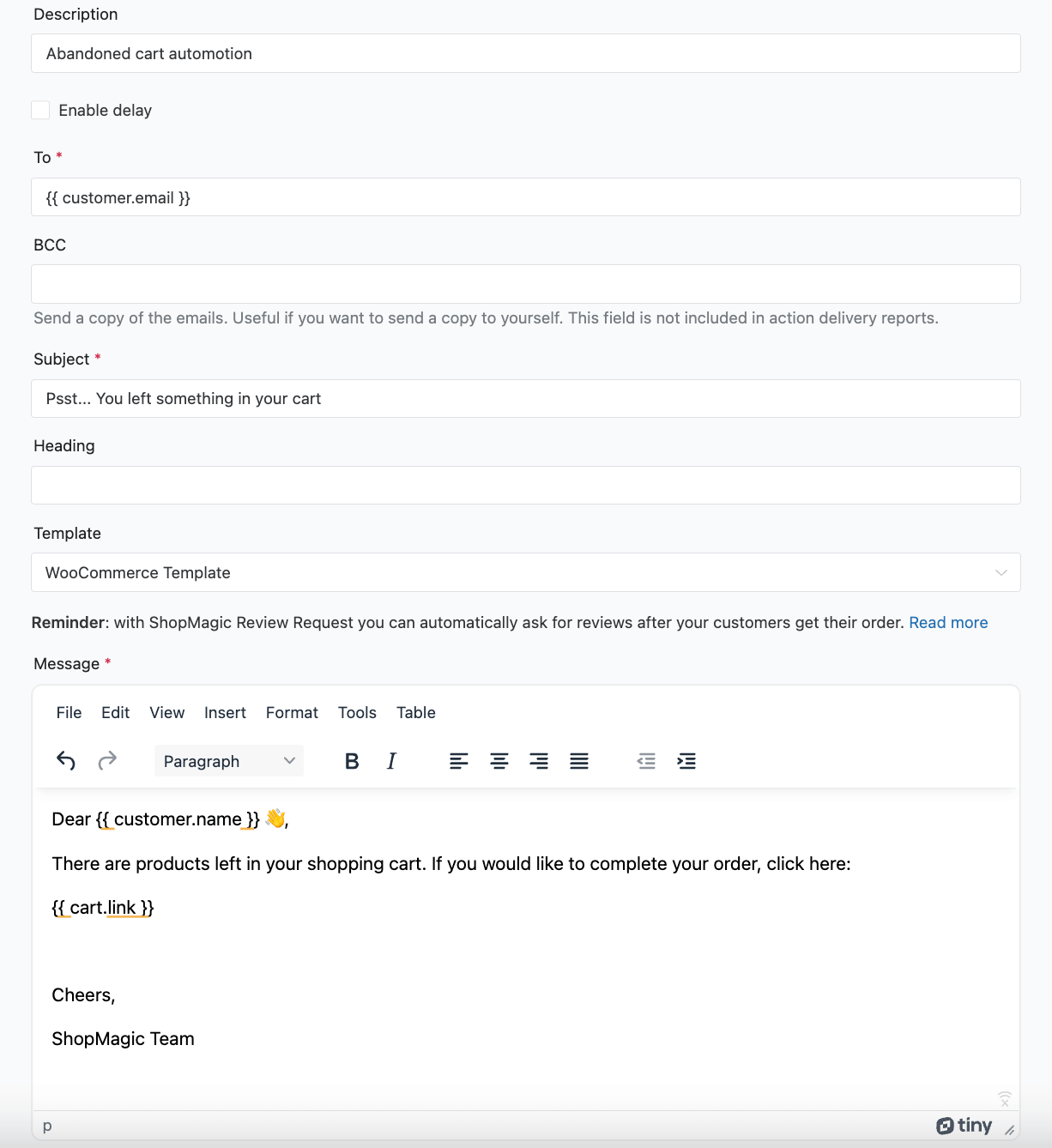
A link that restores the cart. Everything else is secondary and most of it is optional.
The add-on generates a recovery link that rebuilds the basket exactly as the shopper left it and drops them back at checkout. Without that link the email asks someone to go back to your store, find the products again and re-add them, which is more work than they were willing to do when they were already interested.
Beyond the link, keep it short:
What was in the cart, with product names and ideally images, so the message is recognisable at a glance.
The total, including shipping if you can, because for the group that left over surprise costs this is the moment to stop surprising them.
One clear button, repeated as a plain text link at the bottom for email clients that strip styling.
A discount only if you have decided it is worth it. This is the decision most stores get wrong in both directions. A coupon in every recovery email teaches regular customers to abandon deliberately, and that habit is expensive and hard to unwind. Sending no incentive at all leaves some carts unrecovered. The usual compromise is no discount in the first email and a modest one in the second, so you only pay where the reminder alone did not work.
If you do send a code, make it unique per customer rather than one shared code. A shared recovery code ends up on coupon aggregators and gets used by people who never abandoned anything.
Consent: the rule that catches EU stores out
This section was missing from most guides on the subject and it is the one with consequences.
Capturing an address at checkout and using it to recover that specific cart is one purpose. Adding the same address to a marketing list is a different purpose, and it needs its own legal basis. Under the GDPR the two do not come as a pair, and the fact that someone typed their email into your checkout is not consent to receive your newsletter.
This matters here because the obvious next step, pushing captured addresses into Mailchimp, is exactly the move that crosses the line if it happens automatically. The cart recovery message is defensible on its own terms. The marketing list is not, unless the shopper agreed to it separately.
What this means in practice:
Say at the point of capture what the address will be used for. A short line near the email field is enough and costs nothing in conversion.
Keep the recovery email transactional in tone and purpose. It is about their cart, not about your range.
Make the marketing opt-in separate and genuinely optional. An unticked checkbox, not a pre-ticked one, and not a condition of checking out.
Honour opt-outs immediately and keep the captured data only as long as the recovery window, rather than indefinitely.
Have someone check your setup against your own jurisdiction. Rules differ between member states in the details, and the ePrivacy soft opt-in, which allows marketing to existing customers in some circumstances, generally depends on a completed sale. An abandoned cart is by definition not one.
None of this stops you recovering carts. It stops the recovery mechanism quietly becoming a list-building mechanism without anyone agreeing to it.
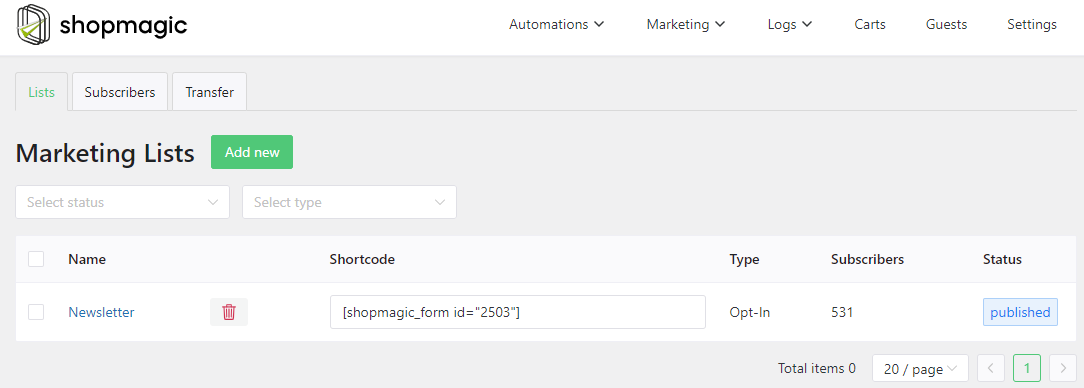
ShopMagic and Mailchimp
The integration is there, and with the section above in mind it is genuinely useful: shoppers who do opt in can be added to a Mailchimp list automatically, so consent collected at checkout flows through without manual work.

The thing to configure deliberately is which action adds someone to the list. Tie it to the opt-in, not to the capture. Those are two different events and only one of them is permission.
Measuring whether it works
The add-on reports how many carts were captured, how many emails went out and how many carts were recovered, which is the only way to know whether any of this is worth keeping.
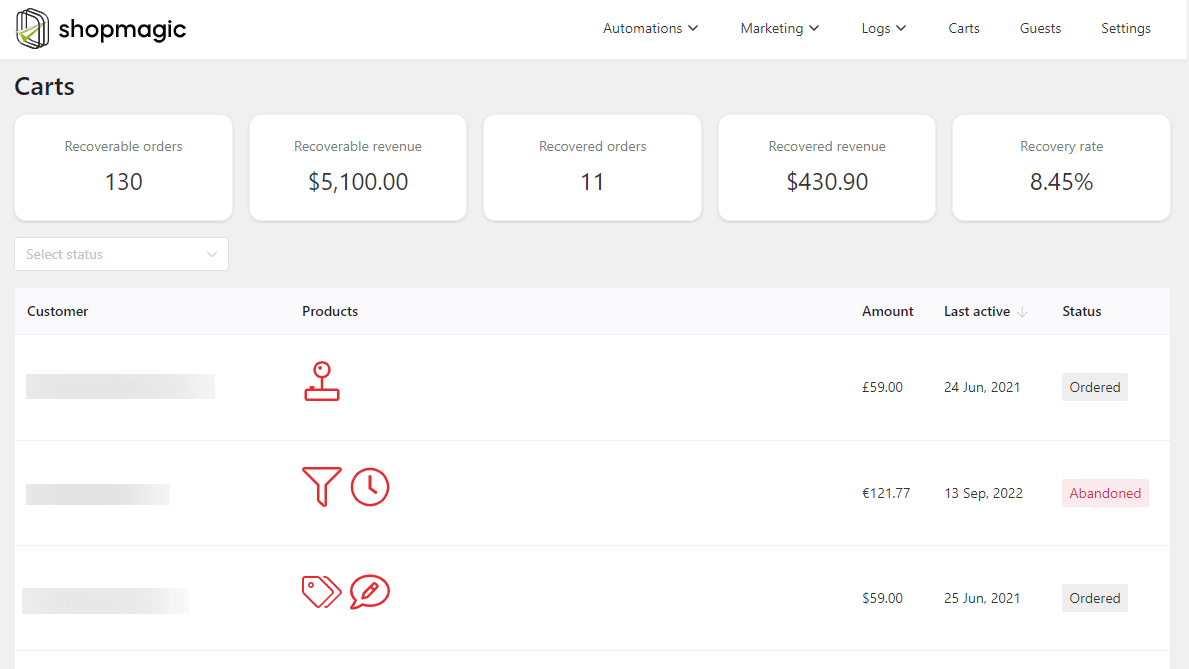
Read the funnel in order, because each stage fails differently. Carts captured against carts abandoned tells you whether the capture works at all, and a low number here means a checkout problem, not an email problem. Emails sent against carts captured tells you whether the automation is firing. Carts recovered against emails sent is the only number that is actually about your email, and it is the last one to optimise, not the first.
Most stores that conclude “abandoned cart emails don’t work” are looking at the third ratio while the first one is broken.
Beyond cart recovery
✅ Delayed Actions postpones any email by a set interval, which is what turns a single notification into a sequence.
✅ Review Requests asks for a review after delivery rather than after payment.
✅ Advanced Filters segments by order value, products, category or purchase history. One caveat specific to this article: filters based on customer history only work for customers with accounts, so in a guest-heavy store they will not apply to most of your abandoned carts.
Common questions answered
Should I target guests as well as registered customers? Yes, and guests are usually the larger group. The add-on captures the address at checkout rather than reading it from a user account, so no registration is needed for recovery to work.
How aggressive should I be? One email in the first hour, optionally a second a day later. Beyond that the returns fall and the complaints rise.
Will two emails be seen as spam? Two inside forty-eight hours, about a cart the person actually filled, normally reads as helpful. Four over two weeks does not. The variable people react to is the time span more than the count.
Should every recovery email carry a discount? No. Discounting by default trains customers to abandon on purpose. Hold the incentive for the second email, if you use one at all.
Tying it all together
Cart recovery is one of the few automations where the work is small and the arithmetic is obvious: the shoppers are already yours, the plugins are free, and the only ongoing cost is the discount you choose to give away. Set it up, measure the funnel for a month, then decide whether to add the second email.
Summary
WooCommerce has no abandoned cart recovery of any kind. There is no cart record, no captured address and no email, because an abandoned cart never becomes an order and WooCommerce only acts on orders. ShopMagic and its Abandoned Carts add-on, both free, add the missing piece by saving the email address from the checkout form before submission, which is also why recovery works for guests rather than only for registered customers.
Three decisions determine whether it recovers anything. Timing: send inside the first hour, ideally within half an hour, because the reminder works by catching a decision that is still live rather than by making a fresh pitch later. Content: the cart restore link is the email, and the rest is supporting detail; without it you are asking someone to rebuild their basket by hand. Consent: in the EU, capturing an address to recover a cart does not permit adding it to a marketing list, which is a separate purpose requiring its own opt-in, and tying the Mailchimp action to the capture rather than to the opt-in is where stores get this wrong.
Before blaming the email, read the funnel in order. If few carts are being captured, the problem is the checkout, not the message, and the figures bear this out: with 87% of stores still on the classic checkout and