





Meet ShopMagic for Twilio – our Twilio WordPress SMS plugin. It adds a completely new action type – text messages (SMS) to your automations. Read on and find out how to implement it in your store.
Are you looking for something faster than WooCommerce emails or would like to implement SMS marketing in WordPress?
Grab a cup of coffee ☕ and let us help you in sending SMS notifications in WordPress and for WooCommerce orders. Let’s begin!
Table of contents
- WooCommerce order SMS notification. Meet ShopMagic for Twilio!
- How does this Twilio WordPress SMS plugin work?
- Where to get the plugin?
- How to connect ShopMagic with Twilio?
- Is that all I can find in ShopMagic?
WooCommerce order SMS notification. Meet ShopMagic for Twilio!
Did I mention that we have created a Twilio WordPress plugin and that it is available for free? I guess not, and it should be a welcome note 😀.
➡️ ShopMagic add-on for Twilio enables automated SMS that is triggered based on WooCommerce events. With this add-on installed, you will be able to send SMS with Twilio from your automations.
Similar to the ShopMagic Abandoned Carts, we decided to create and publish this add-on for free, for everyone. This way, every WooCommerce store owner who wants to send WooCommerce SMS to the customers can do it with ShopMagic.
ShopMagic for Twilio: WordPress SMS Marketing plugin
This ShopMagic free addon enables sending and receiving WooCommerce Twilio SMS notifications. Download it and try it out - it's free!
Download for free or Go to WordPress.orgHow does this Twilio WordPress SMS plugin work?
ShopMagic for Twilio adds a new action type – Send WooCommerce SMS. The name speaks for itself. You don’t need any special skills to activate our WooCommerce Twilio order SMS notifications plugin. On top of that, you can apply existing hooks and make your work even easier. The available hooks will make it easy for you to edit the content of the text messages.
We created a WordPress sms marketing plugin that will do all the work for you. Just make sure you have it installed and all the rest. Consider it done 🙂. In other words, instead of sending an email, your customer will receive a text message from your WooCommerce store.

Where to get the plugin?
There are 3 ways to get it. All of them are 100% secure so don’t worry about that 😇.
1️⃣ You can download this WordPress and WooCommerce SMS marketing plugin directly from here:
ShopMagic for Twilio: WordPress SMS Marketing plugin
This ShopMagic free addon enables sending and receiving WooCommerce Twilio SMS notifications. Download it and try it out - it's free!
Download for free or Go to WordPress.org2️⃣ Another option is to download it directly from the WordPress repository.
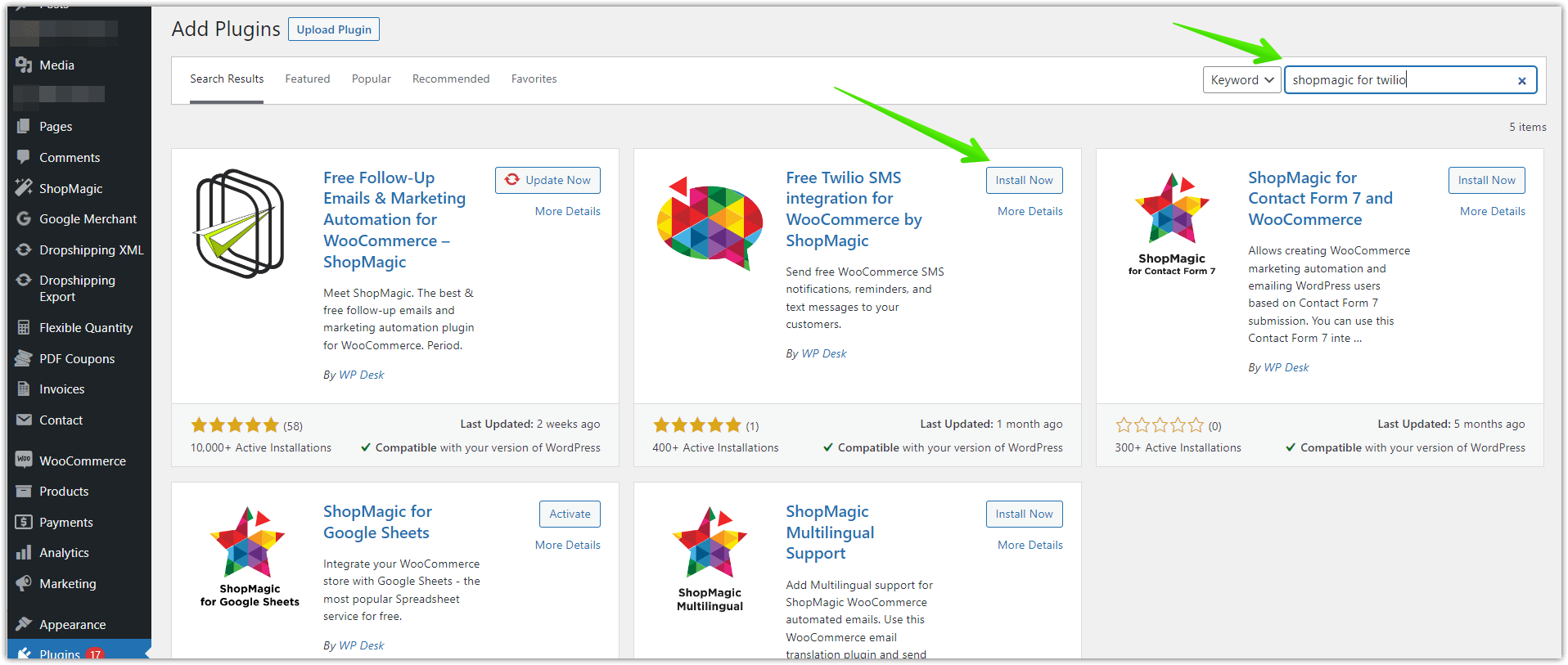
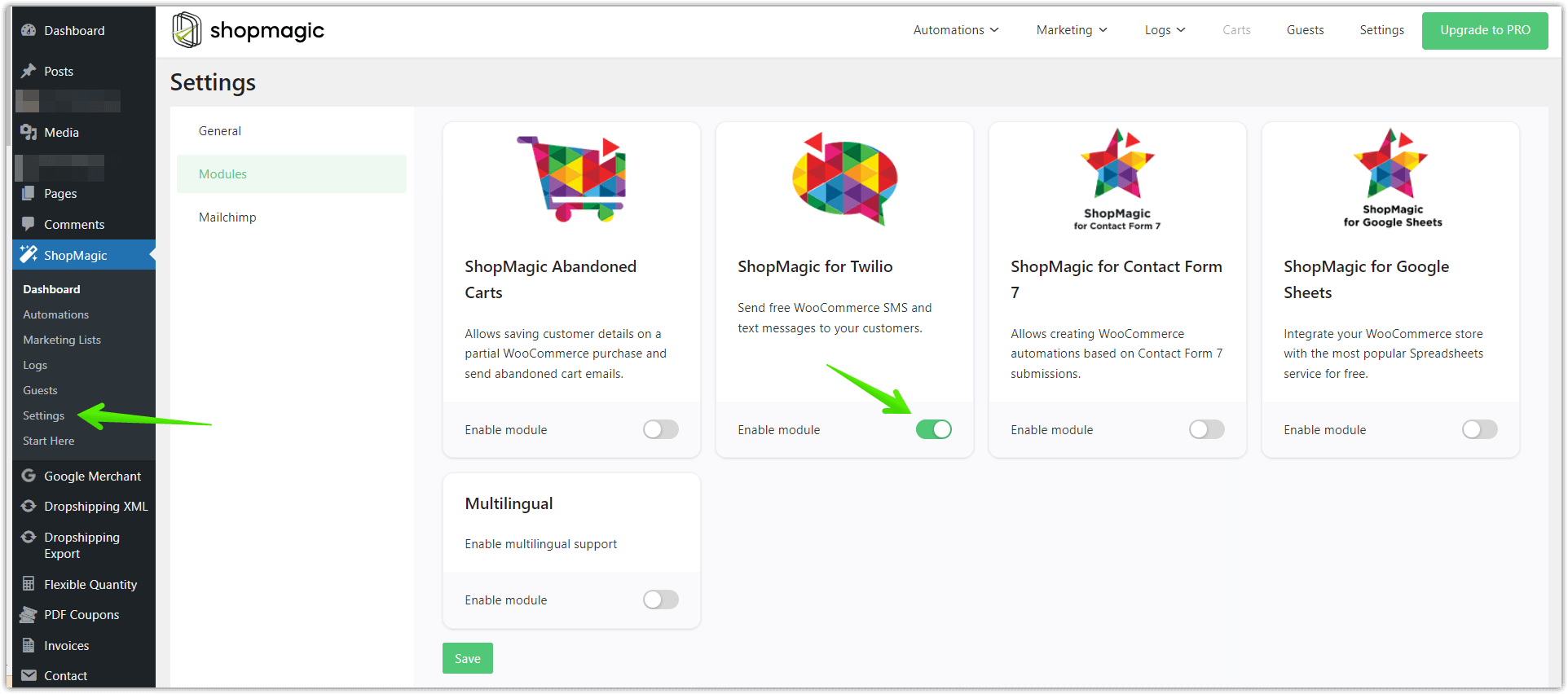
3️⃣ Third and the easiest option (if you are already a ShopMagic user) is through the plugin settings. Open ShopMagic’s settings and navigate to the Twilio tab. Click on the Enable Module toggle, and you are good to go! Start sending WooCommerce SMS order notifications right away 🚀.
ShopMagic Twilio is a free add-on, but it only works if you download ShopMagic first. No worries, it’s free, too 😀.
How to connect ShopMagic with Twilio?
The only requirement to use this add-on and send WooCommerce SMS is to have a Twilio account. ShopMagic will already take care of everything else, which of course includes also sending WooCommerce order sms notifications.
When you already have one, visit the Twilio tab in ShopMagic settings:
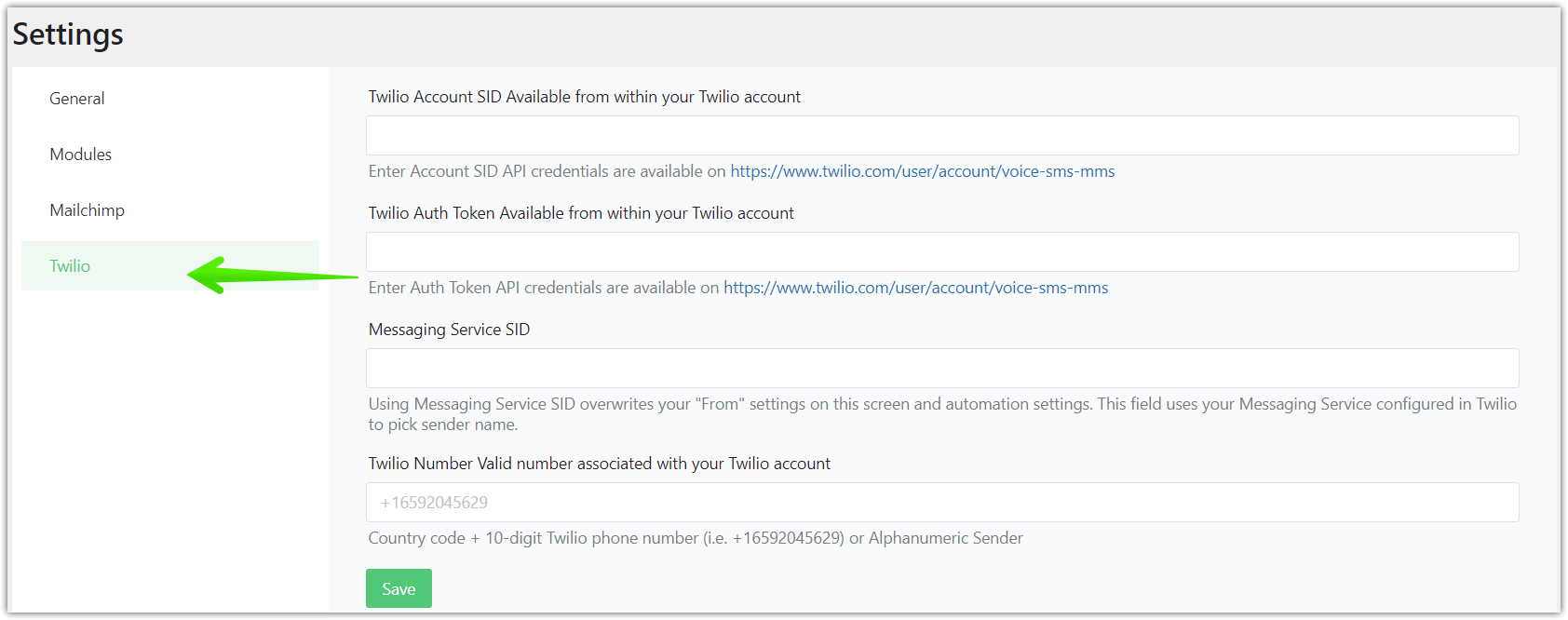
Here you will have to enter a valid:
- Twilio Account SID
- Twilio Auth Token
- Twilio Number
And that’s it! Congratulations, you have successfully connected ShopMagic with Twilio and you can start to use the add-on right away.
Is that all I can find in ShopMagic?
Of course not! Apart from integrating ShopMagic with Twilio in this precise version, we have more free stuff for you 😎.
➡️ At the moment, the basic version of the ShopMagic plugin has as many as 5 free add-ons.
These add-ons will allow you to:
- Send SMS messages from WordPress and WooCommerce [This article 🙂],
- Translate emails into other languages,
- Retrieve abandoned shopping carts,
- Integrate orders with Google Sheets,
- Create automations based on Contact Form 7.
I hope that you’ll like the new features. Stay tuned for what’s next!
Related to WooCommerce Twilio SMS notifications
-
ShopMagic for Slack PRO Addon

Connect Slack with WooCommerce. Send WooCommerce order notifications to Slack. Get the ShopMagic for Slack addon. -
ShopMagic for Google Spreadsheets

Export orders to Google Sheets. Find out how to use ShopMagic to export orders to Google Spreadsheets.
