
• Skip to primary navigation
  • Skip to main content
ShopMagic logo cropped for use as a site icon
WP Desk

WP Desk

WooCommerce Plugins

Flexible Invoices

Flexible Invoices

Automate invoicing

Flexible Coupons

Flexible Coupons

Gift cards and tickets

ShopMagic

  • Pricing
  • Add-ons
  • Docs
  • Support
  • Blog
  • Ideas
  • My account
  • English
ShopMagic 2.29 is here: Contact Form 7 integration

Published: September 1, 2021 / Updated: October 23, 2026 / Blog, New Release Wednesday

ShopMagic 2.29 is here: Contact Form 7 integration

Damian Machnik

As we promised in the ShopMagic 2.28 plugin update, August was an integration month in our team. At the beginning of the month, we released ShopMagic for WooCommerce Bookings integration. Now it’s time to introduce free integration with very popular contact form plugin for WordPress, which is Contact Form 7.

How ShopMagic for Contact Form 7 works?

This plugin lets you use Contact Form 7 submissions directly in your automations. For example, you can automatically add email address submitted in the form to MailChimp list or, reversely, create follow-up email to the email left by the website user.
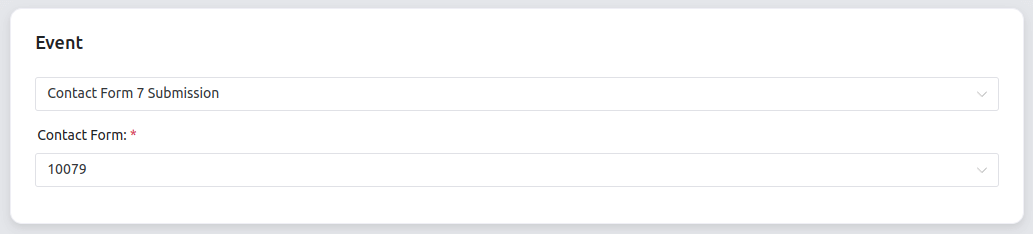
Our plugin will automatically store necessary data, so no need to use other plugins for it.

This integration adds a new event, and some new placeholders, which will let you intercept all of the data submitted in CF7 to ShopMagic. You can read more about them (and whole new possibilities of this integration) in a dedicated docs article.

Read more about using Contact Form 7 to improve marketing in your WooCommerce store: WooCommerce Email Marketing with Contact Form 7

ShopMagic for Contact Form 7 is available for free

Similarly to the ShopMagic Abandoned Carts and ShopMagic for Twilio, Contact Form 7 integration is available to download for free from the WordPress.org website.

Bear in mind that it is an add-on which requires the core ShopMagic plugin.

What else can you find in ShopMagic 2.29

We fixed a couple of small issues with communication preferences page, i.e. communication page in account occasionally showing 404 errors and creating communication page before `wp_loaded`.

About Damian Machnik

Product Manager en WP Desk. Cada día intento crear productos mejores y más interesantes. Si tienes alguna pregunta, ¡no dudes en enviarme un correo!

  • Terms & Conditions
  • Privacy Policy
  • Support Policy
  • Refund Policy

© 2026 A WP Desk WP Desk Automation

Manage Consent
To provide the best experiences, we use technologies like cookies to store and/or access device information. Consenting to these technologies will allow us to process data such as browsing behavior or unique IDs on this site. Not consenting or withdrawing consent, may adversely affect certain features and functions.
Functional Always active
The technical storage or access is strictly necessary for the legitimate purpose of enabling the use of a specific service explicitly requested by the subscriber or user, or for the sole purpose of carrying out the transmission of a communication over an electronic communications network.
Preferences
The technical storage or access is necessary for the legitimate purpose of storing preferences that are not requested by the subscriber or user.
Statistics
The technical storage or access that is used exclusively for statistical purposes. The technical storage or access that is used exclusively for anonymous statistical purposes. Without a subpoena, voluntary compliance on the part of your Internet Service Provider, or additional records from a third party, information stored or retrieved for this purpose alone cannot usually be used to identify you.
Marketing
The technical storage or access is required to create user profiles to send advertising, or to track the user on a website or across several websites for similar marketing purposes.
  • Manage options
  • Manage services
  • Manage {vendor_count} vendors
  • Read more about these purposes
View preferences
  • {title}
  • {title}
  • {title}