





In this article, you’ll learn about WooCommerce email translation built-in ShopMagic – a free plugin to customize emails. Send beautiful messages in WordPress and WooCommerce in many languages. Get the free plugin compatible with WPML and start sending custom and translated emails in WooCommerce today!
Don’t you know how to translate emails in WooCommerce?
Running your store in different languages is possible with WooCommerce. Now, you may also cover the WooCommerce email translation with ShopMagic and WPML integration. Read to learn more!
Table of contents
- WooCommerce email translation is now possible
- ShopMagic Multilingual – how does this WooCommerce Email Translation work?
- Summary & more about ShopMagic
The plugin is meant for sending follow-ups, automated emails, and marketing automation in WordPress and WooCommerce.
I’ll leave you a link to download its free version below ⤵️
ShopMagic
Free Follow-Up Emails & Marketing Automation for WooCommerce. Download ShopMagic free and complete its functioning by adding the free WooCommerce Email Translation addon.
Download for free or Go to WordPress.orgWooCommerce email translation is now possible
ShopMagic is multilingual 🎉!
If you want to use it, you’ll need to download our newest addition to the WordPress repository – ShopMagic Multilingual Support. This small plugin will connect ShopMagic and WPML plugins, thus unlocking support for creating email automation in multiple languages.
ShopMagic Multilingual – how does this WooCommerce Email Translation work?
We follow the idea that pictures and images say more than a thousand words. So, we have prepared screenshots that will best show you how the plugin works.
After installing ShopMagic, you can enable the translation module in the plugin settings.
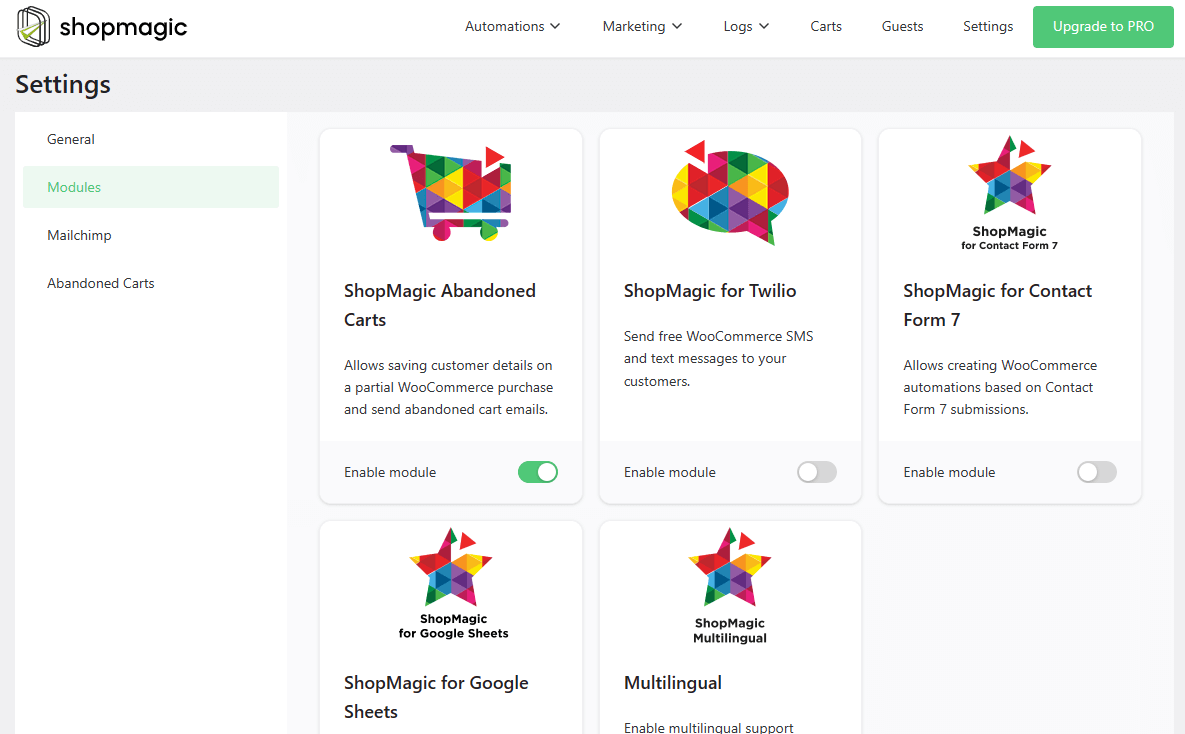
Then, you will see a tab with available languages in the panel on the right. You will be able to select the language when you create a new automation, exactly as shown in the screenshot below:

In the Marketing Lists tab, there will be a new column – Language. Here you will quickly see in what language a particular automation or follow-up email was created (or translated).
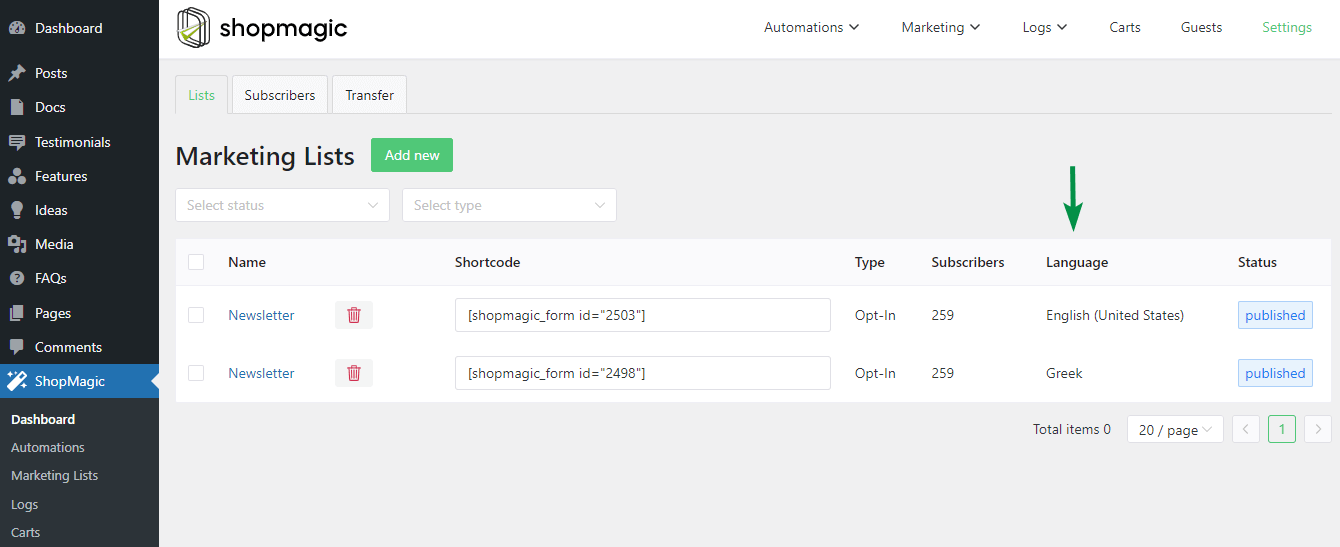
👉 If you have any questions about the WooCommerce email translation module, check out the plugin documentation.
What about other multilingual plugins?
If you ask, hey what if I’m using Polylang, Loco Translate, TranslatePress, or any other plugin? These integrations will also be supported by ShopMagic Multilingual Support in a – not so distant – future 😀.
ShopMagic add-ons
You may also use more free add-ons to boost your WordPress and WooCommerce marketing. For example, Contact Form 7
Check out all free and PRO add-ons →
Summary & more about ShopMagic
Today, you’ve learned how to translate custom emails in WooCommerce with a free plugin!
Download ShopMagic and start building your multilingual email marketing in WordPress and WooCommerce today!
ShopMagic
Free Follow-Up Emails & Marketing Automation for WooCommerce. Download ShopMagic free and complete its functioning by adding the free WooCommerce Email Translation addon.
Download for free or Go to WordPress.orgIf you have any questions, let us know.
Finally, check out our blog for more tips about email marketing and use cases of the plugin.
Related to WooCommerce email translation
-
ShopMagic + Google Analytics [integration]

Integration with Google Analytics. Now ShopMagic is also a WooCommerce Google Analytics integration! -
ShopMagic + Slack [integration]
Integration with Slack. Start sending messages to Slack from WooCommerce with a WordPress integration plugin.
