



A customer says the confirmation never arrived. It was sent, the log says so, and it is sitting in a spam folder or was typed with a missing letter. What happens next in most stores is somebody opens the order, finds no way to send it again, and pastes the details into a personal email.
How to resend an order email in WooCommerce
From the order screen itself, using the order actions box in the top right, which can resend the new order notification and the invoice or payment request. That covers the two commonest requests and it is built in.
What it does not cover is everything else. There is no built-in way to resend a completed order email, a shipping notification or any message you built yourself, and those are the ones customers ask about most. The processing and completed emails carry the tracking link, which is the single most requested piece of information in any support inbox.
So the honest answer is that WooCommerce handles part of this and leaves the rest to you. Knowing which part is which saves the five minutes everybody spends looking for a button that is not there.
Why pasting it into a personal email is worse than it looks
It works, and that is the problem, because it works just well enough that nobody fixes the underlying gap.
The copy that goes out carries none of the store’s formatting, arrives from a personal address that may not be authenticated, and exists nowhere in the order history. Three weeks later, when the customer says they were never told, there is no record. The reply also lands in a personal mailbox rather than wherever support is handled, which means the next person to pick up the conversation starts without it.
There is a practical cost too. Retyping an order total or an address is how a support message becomes a complaint, and it happens often enough that it is worth removing the opportunity rather than training people out of it.
Running an automation by hand
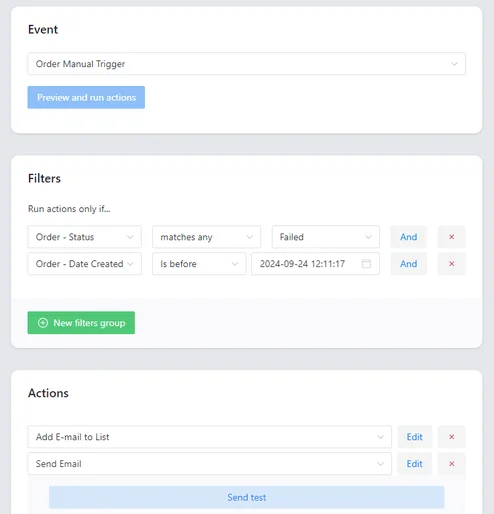
The version that scales is to make every message in the store runnable on demand, against a specific order, by a person. The same automation that normally fires on a status change gets a second way in: somebody clicks it.
That gives a support person three things the paste does not. The email is the real one, with the correct template and the correct data pulled from the order. It is sent from the store, so it is authenticated and consistent with everything else the customer has received. And it appears in the order’s own history, so the next question about it has an answer.
It is also how you handle the cases no trigger covers. A one-off apology, a manual discount, a replacement tracking number: these are not worth building an automation around, and they are exactly what a manual send is for. If an automation does not appear to have run at all, that is a different problem, and our case study on a failed automation covers the diagnosis.
The point is that a support person sends the real email rather than a retyped copy of it. Manual Actions adds a button that runs any automation against the order on screen, so the message that goes out is the one the store would have sent.
Summary
WooCommerce can resend two emails from the order screen’s actions box, the new order notification and the invoice or payment request, and nothing else. There is no built-in way to resend a completed order email, a shipping notification or a custom message, which is unfortunate because the processing and completed emails carry the tracking link, the most requested piece of information in any support inbox.
Pasting the details into a personal email works well enough to stop anybody fixing it, and it costs more than it appears to. The message carries no store formatting, comes from an address that may not be authenticated, leaves no record on the order, and lands replies in a personal mailbox rather than in support. Retyping a total or an address is also how a support message turns into a complaint. The version that holds up is making every message runnable by hand against a specific order, so the same automation that fires on a status change can also be triggered by a person. That sends the real email with the real data, from the store, and records it on the order, and it covers the one-off cases no trigger exists for.
Frequently asked questions
These three come up in every support inbox.
Why did the customer not receive the original email?
Usually spam filtering or a mistyped address. Check the store’s sending authentication before assuming it is the customer’s mailbox.
Does resending create a duplicate order?
No. Sending a message again does not change the order, and the customer simply receives a second copy of the same email.
Can a manual send go to a different address?
That depends on the setup. Correcting the address on the order first is usually better, because it fixes every future message rather than one.
