





ShopMagic v4.3.0 → Packed with New Features – Including GetResponse WordPress Integration! 🚀
ShopMagic, one of the most comprehensive automation plugins for WooCommerce, is preparing for another exciting update. This release includes GetResponse WordPress integration and enhancements to make customer relationship management even easier. The updated features are available in the core plugin and extensions such as ShopMagic WooCommerce Subscriptions → and ShopMagic Customer Coupons →.
Read the article to learn more! 🤓
Table of Contents
- ✅ ShopMagic WooCommerce: GetResponse WordPress Integration ⇣
- ✅ New Placeholders: Order and Customer ⇣
- ✅ ShopMagic WooCommerce Subscriptions: Order Type Placeholder ⇣
- ✅ ShopMagic Customer Coupons: New Capabilities ⇣
GetResponse WordPress: About the Integration
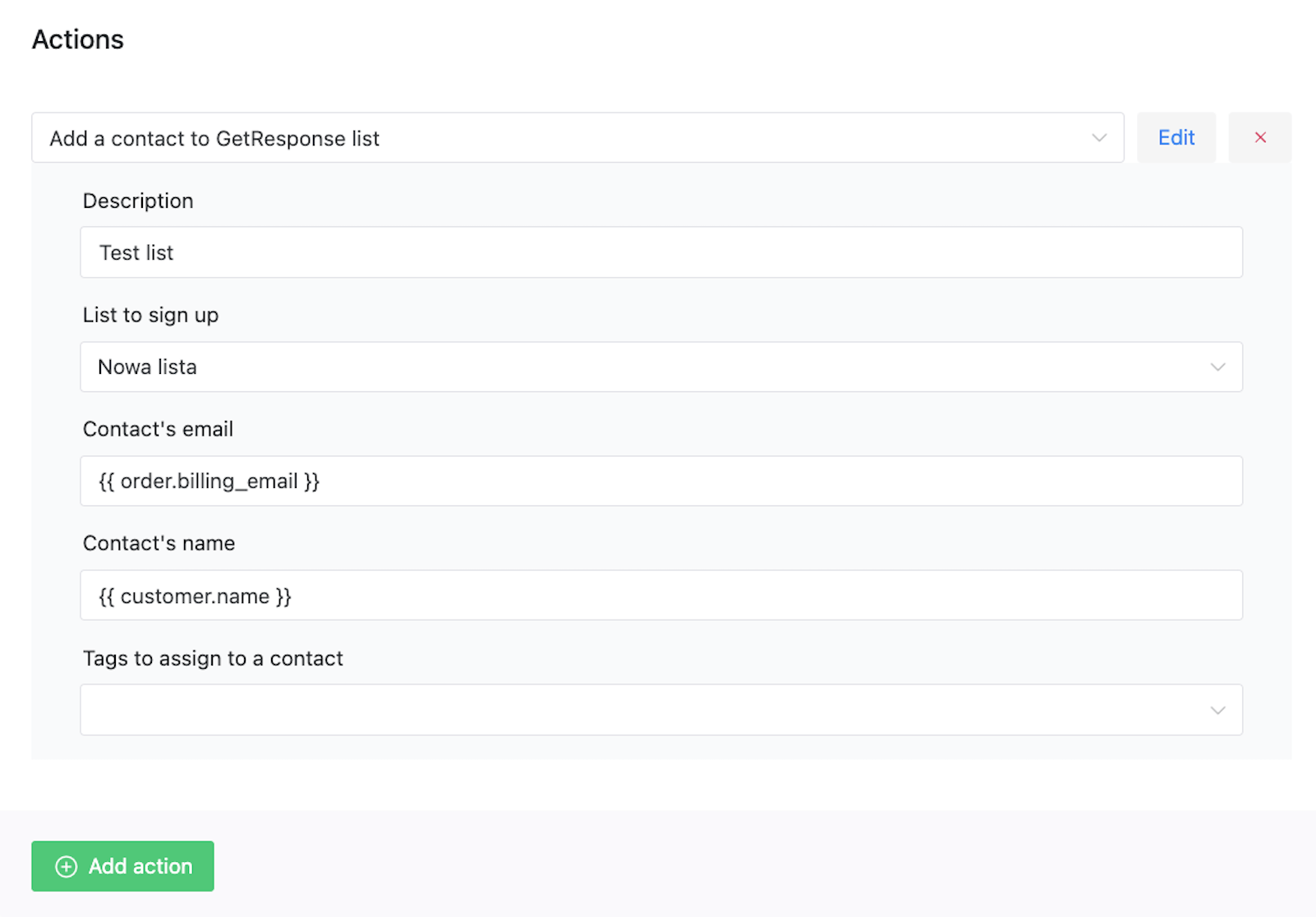
The new ShopMagic update introduces GetResponse integration with WordPress. Now, you can automatically send customer data directly to your GetResponse mailing list. This feature supports selecting a specific list for the contact to be added to and allows you to add the customer’s email and name.
📋 Additionally, you can add optional tags (tags must already exist in the GetResponse system). Using this feature enables better customer segmentation and the creation of more personalized campaigns.
New Placeholders in ShopMagic
The new version of ShopMagic also expands placeholder functionality. The latest update introduces several new placeholders and modifies existing ones:
order.total: We’ve modified this placeholder. As before, it will display values in HTML by default, allowing you to show price values together with the currency code. To make it more flexible, Bartek (the plugin’s developer) added a Raw option, which will allow you to pass only the numeric value (without currency and HTML code). We hope this will be useful, especially in the free Google Sheets integration!order.status: A completely new placeholder that allows you to display the order status (for example, in an email’s content). Simple!customer.company: The second new placeholder that lets you display the customer’s company name if this information was provided in the order form. 🙂
ShopMagic for Woo Subscriptions: Order Type Placeholder
For users of ShopMagic with WooCommerce Subscriptions, the update introduces another new placeholder called order.type.
With this, you can include the subscription order type in your email content. Available options are: resubscription, renewal, parent order, subscription switch, and regular order.
This feature will greatly simplify subscription lifecycle communication and – we hope – streamline your automation processes related to managing subscription orders.
ShopMagic Customer Coupons: New Capabilities
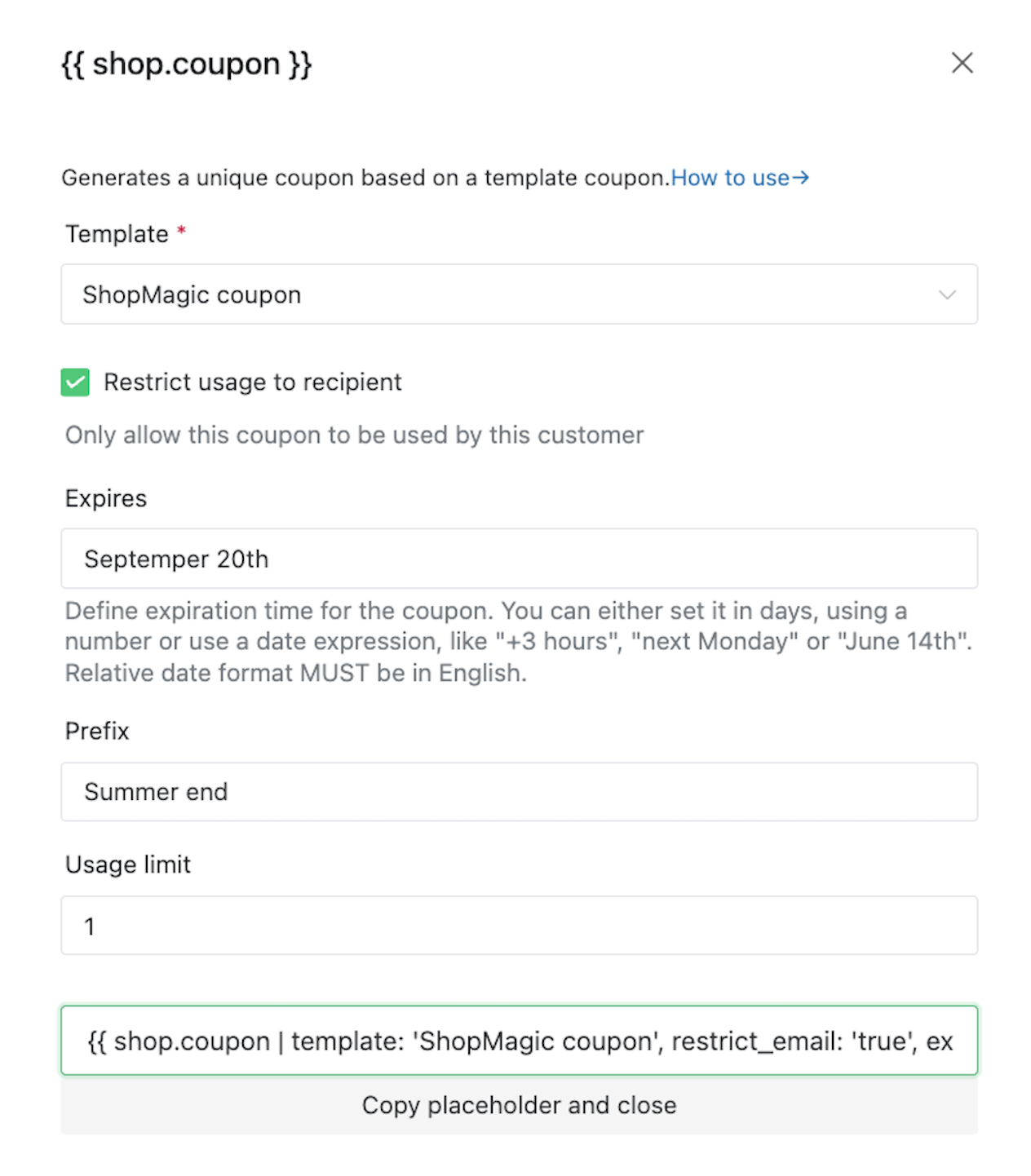
Users of ShopMagic Customer Coupons can also expect important improvements. The update introduces several new parameters and events:
The shop.coupon placeholder has gained new functionality.
The expires parameter now supports English textual values, such as next Friday or +1 week, in addition to numbers. Additionally, we’ve added a restrict_email parameter, which allows limiting the coupon to only the customer who received the email.
That’s not all! We’ve also added:
A brand-new event called Coupon Published that triggers when a coupon’s status changes to published, as long as there is at least one email address listed in the Restricted Emails section.
Another event called Coupon Before Expiration: If a coupon has an expiration date set and an email assigned in the Restricted Emails section, you can set up an automation that triggers a specific number of days before the coupon expires.
Summary
The ShopMagic update brings a range of new features that will significantly enhance WooCommerce store management. Integration with GetResponse, new placeholders, and coupon improvements provide users with even more options for personalization and automation.
Bartek and I hope you’ll enjoy the changes in ShopMagic! ❤️
